Image Map

6.30.2014

6.14.2014

Countdown to Summer Giveaway - Winner Chooses 3 Prizes!

summer-giveaway
I'm participating in the Countdown to Summer Giveaway, hosted by Pretty My Party, Mom Spark, Sassy Steals, and a group of awesome bloggers!

Summer is definitely my favorite time of year! The vacations, relaxation, hot weather, swimming...I could go on and on! To celebrate summer, I've teamed up with some awesome bloggers and businesses to bring you the best summer giveaway ever! One winner will get to choose 3 (yes 3!) of the prizes listed above! To see the full list of giveaway sponsors, please visit the Rafflecopter entry form below.

Freebie Finding Mom, Cloudy With A Chance of Wine, Play.Party.Pin, Gimmie Freebies, Where the Green Grass Grows Designs, B.Lovely Events, Trish's Design Studio, Design Dazzle, An Alli Event, Pick Cake Plate, A Delightsome Life, The Nest Effect, NEPA Mom, Punk n Pie Couture, Karina Pires Photography, Bits n Pieces Events

COUNTDOWN TO SUMMER GIVEAWAY!
June 13, 2014 at 12 a.m. EST to June 21, 2014 at 11:59 p.m. EST
Open Worldwide
Prizes: 1 winner will choose 3 prizes: Inflatable Water Park, Canon Digital Camera, iPad Mini, or $500 PayPal cash.
Eligibility and Rules: NO PURCHASE NECESSARY TO ENTER OR WIN. A PURCHASE DOES NOT IMPROVE YOUR CHANCES OF WINNING. VOID WHERE PROHIBITED BY LAW. This giveaway is open to individuals 18 and older. The winner will be chosen randomly through the Rafflecopter form. It is the sole responsibility of the winner to adhere to all laws, which includes payments to any governing tax body.
Winner Selection: The winner of the giveaway will be selected in a random drawing through Rafflecopter from among all eligible entries received throughout the promotion period. The random drawing will be conducted within 48 hours of the closing of the giveaway by Pretty My Party or its designated representatives, whose decisions are final. Odds of winning will vary depending on the number of eligible entries received. Winner will be notified by email at hello@prettymyparty.com. Potential winner must accept the prizes by email as directed by Pretty My Party within 48 hours of notification. Any winner notification not responded to or returned as deliverable may result in prize forfeiture. The potential prize winner may be required to sign and return an affidavit of eligibility and release of liability, and a Publicity Release (collectively “the Prize Claim Documents”).
Rafflecopter Disclaimer: This promotion is powered by Rafflecopter. Metric Feat, LLC (“Rafflecopter”) does not sponsor, administer or endorse this promotion. By entering this giveaway, participants agree to Rafflecopter’s Privacy Policy.
Social Media Disclaimer: Entrants should understand that they are providing their information to the sponsors of the giveaway and not to Facebook, Pinterest, Twitter, Instagram or Google+. This promotion is in no way sponsored, endorsed or administered by, or associated with any of these social media sites.
Disclaimer: This giveaway is blog sponsored and is in no way associated with any of the brands and/or products listed above. If there are any questions, please email hello@prettymyparty.com.
PLEASE USE THE RAFFLECOPTER FORM BELOW TO ENTER
The more entries you complete on the Rafflecopter form, the higher your chances are of winning. If you don’t have time to fill out all of the entries you may come back and complete any entries that you may have missed. Good luck!
a Rafflecopter giveaway

6.13.2014

Friday Favorite: Next Issue


I love reading magazines but can't stand when I don't have the time for them and they stack up. When the stack gets to be two or more months of magazines high, I usually just throw them out. {Those that I can take to school for projects, I do, as long as they're "clean".} I feel like I'm wasting money throwing them away.

http://bit.ly/1oQERoF


Last year I discovered Next Issue and haven't looked back. Next Issue is a subscription service that gives you unlimited access to over 135 magazines. I love that I can view back issues that I may have missed and I can access my subscription from all of my devices - Android, iPad, and Windows 8.


I currently have 30 magazines that I get the updates for on my app. My favorites are ShopSmart {which I always felt was a very expensive print subscription for only 10 issues}, Better Homes & Gardens, Do It Yourself, HGTV Magazine, Real Simple, Self, & PC World. I have my favorites set up to automatically download new issues. All of the others will download the current issue when I click on it. Any downloaded issues can be accessed offline, so you can read them when you don't have a connection - like on an airplane. What's better than having several of your favorite magazines at your fingertips on a long flight without adding the extra weight to your carry on?


Pricing is $9.99 a month for unlimited basic {127 magazines to choose from - this is the one I subscribe to} or $14.99 a month for unlimited premium {137 magazines to choose from - adds selections like People, Sports Illustrated, Entertainment, Time, & more}.

Interested in trying Next Issue? Sign up and receive a free 60 day trial to decide if Next Issue is for you.

6.11.2014

40 Day Summer Challenge: Cleaning the Oven


Last Monday I posted about my 40 Day Summer Cleaning & Organizing Challenge. I've already crossed off 7 items. Today I'm blogging about how I clean my oven without using harsh chemicals. This was the first thing I crossed off the list. I hadn't cleaned my oven since I moved into my apartment last July. It was starting to smell awful when I'd turn it on...like something was burning. Not good.

I used to hate cleaning my oven. The nasty chemicals that you'd have to spray after preheating the oven and blah blah blah...so gross. Then I discovered Shaklee Scour Off. All you have to do is wet a sponge or cloth and wipe the putty all over the areas that need to be cleaned. Let it sit for 10 minutes and wipe off. If you use a scour pad, the tougher gunk comes off with easily with a little bit of scrubbing. Check out my before and after photos below.


6.06.2014

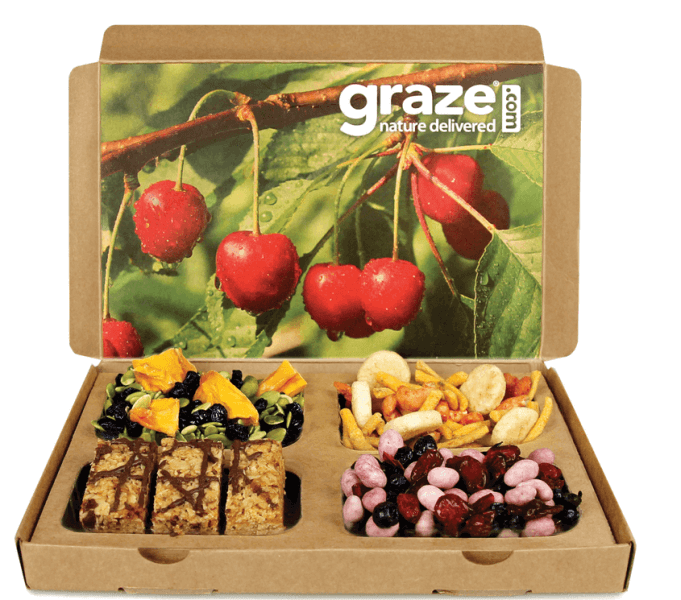
Friday Favorite: Graze.com


I was recently introduced to Graze.com by a fellow teacher at my school. I'm so happy I decided to try it out for myself!


Graze is a subscription service {with no commitment} that specializes in healthy, portion controlled snacks. I'm always cautious with subscription services because I don't want to be "locked in" to something that I potentially won't like. Because I signed up through my friend, I received my first box free - no strings attached. I loved it so much that I decided to stay subscribed. It's just $6 a box with free shipping.

Once you're subscribed you can go into your account and customize your box. I'm able to rate the items I receive so they get to know my taste and can send things similar to those that I rate "like" and "love". I just received my second box this week and love everything I've tried so far.

Each nibble and calorie counter box comes with 4 snacks. {I get the nibble box.} You also get to choose how often you want to receive your Graze boxes - every week or every 2 weeks. Also, if you decide you want to cancel, you can easily do so online, but because they prepare boxes in advance, it has to be at least a week before your next shipment.

Interested in trying it Graze? If you sign up with my promo code, you can get your 1st and 5th box free! The code is: QDV7G25RP

If you decide to try Graze, let me know what you think! If you already have tried it, I'd love your feedback, too. :)

6.05.2014

Microsoft Champions Summit Spring 2014 - Day 3 #WindowsChampions #ChampionsSummit


On Tuesday we had a few more informational sessions in the morning before heading out for some fun sightseeing!

I learned a lot in the session on OneNote collaboration. We used our Windows Phones that we were given on Sunday to complete a scavenger hunt in the Ballard neighborhood. We were given a list of items/places to go search for and take a photo of and place in our shared OneNote notebook. It was pretty cool to work with others on the same notebook and instantly see the changes pop up before me on my phone every time they'd add a picture.

Our afternoon consisted of a Brewery Tour around the Ballard neighborhood with Road Dogs Tours. Only half attended this, while the others went to a waterfall. We had an absolute blast and were able to visit 4 different breweries in the area.


Dinner at Bastille was delicious and the perfect last meal together.


Those of us that didn't have to get up super early for a flight went to King's Hardware to play skee-ball until the wee hours of the morning.


What a trip with amazing memories and new friends made!

Thank you to Microsoft and the Windows Champions/Office Champions teams for making all of this possible.

Disclosure: I am a Windows Champions blogger and I received loan of a laptop and tablet, and may receive other equipment from Microsoft to assist me in evaluating Microsoft products and services for my blogging activity. I was sent to Seattle to attend the Champions Summit and received products while attending the summit. All opinions expressed are my own.

6.04.2014

Microsoft Champions Summit Spring 2014 - Day 2 #WindowsChampions #ChampionsSummit


On Monday we traveled to Redmond to visit the Microsoft Campus. I was completely blown away by how beautiful it is.


First we visited Building 99 - Microsoft Research.


We learned about virtual assistants located in the research building. This directions robot uses Microsoft Kinect technology to recognize when someone steps up to him to ask for directions. You could ask for directions to a specific room or give a person's name who works there. If you were looking for someone specific, he would let them know that you were on your way to them. It was pretty neat.


Next we met Michael Cohen, creator of Gigapixel ArtZoom. He explained his project to us and gave us a demo of how it works. Basically, they took high quality photos as a 360 panorama of Seattle. You can zoom in to see areas of Seattle up close {from very far away} and view the area as if it were right in front of you. There are "hidden" performers, acrobats, and artists throughout the panorama. When you find them, you can click on them and view a short clip about their work. It's a pretty amazing concept. Since launching the website, they've been approached by other cities around the world to create a Gigapixel ArtZoom. Check it out!


We headed to a space called The Garage on the Microsoft Campus next for lunch and informational sessions. We had 6 hours of sessions, so I'm just going to sum up my favorites for you.

My favorite session was about Bing internet search. First of all - did you know that you can earn credits for Bing Rewards just by searching? You can use those credits for a variety of items. I used my first redemption to get 100 GB of extra storage in my OneDrive account. Now I'm saving up for a Surface tablet for my school. But what was most informative for me was about Bing in the Classroom. Here's the facts on what Bing in the Classroom is all about...
Part of Microsoft’s continued focus on promoting digital literacy in education, Bing in the Classroom is an ongoing program focused on helping kids use technology to inspire and satisfy their curiosity. It provides ad-free, safer, more private search in schools, daily lesson plans that inspire critical thinking, and a rewards program that community members can use to earn tablets for their schools. More information can be found at http://www.bing.com/classroom, and you can track the progress of specific schools at http://www.bing.com/findyourschool.
  • Ad-free, safer, more private search. Bing in the Classroom removes all advertisements from Bing search results, filters adult content, disables the use of searches to send personalized ads, and adds specialized learning features to enhance digital literacy. {Program excludes Bing apps.} Over 4.5 million students in more than 5,000 schools are covered by our enhanced search, with over 35 million ad-free queries served to date.
  • Daily lesson plans. Bing is well known for having a big, beautiful homepage image that changes daily and inspires visitors to explore their world. With Bing in the Classroom, we’ve used that homepage inspiration to create free daily lesson plans that help students learn how to search the Web effectively while inspiring their curiosity.
  • Earn Surfaces with Bing Rewards. The Bing in the Classroom tablet program is an extension of an existing Bing program, Bing Rewards. With Bing Rewards, you can earn credits just by searching the Web on Bing from your browser or phone and for trying out new Bing features. And now, with Bing in the Classroom, you can donate those credits to the school of your choice; Microsoft will pool them with other supporters of that school and, as soon as your school meets the credit minimum, send it a Microsoft Surface tablet with Type Cover. About 60 people using Bing Rewards can earn a tablet for a school in a month.
  • Keep track of your school. Bing in the Classroom offers a page for every school in the U.S. that tells you not only if it is receiving ad-free, safer search but also how many Rewards credits have been donated, by how many people, and how many Surface tablets schools have earned.
The next session was on Skype. On April 28 Skype made group video calling free for all! That was the big announcement of that session, and I was given a sneak peak of some upcoming features that will be released soon. But my lips are sealed! :)

The session on Digital Spring Cleaning was awesome. I learned a lot about how Outlook.com makes email easy to deal with. Some awesome features that Outlook has are sweep, an unsubscribe link at the bottom of every newsletter email {that way you can for sure unsubscribe in case the company just happens to not include a link in the email}, rules, flags, floating icons to delete/flag/mark as unread. {I'll write a special post on Outlook later to explain all of this in more detail.}

I also learned how OneNote can make your life so much easier by creating a place to catch all of your notes, recipes, to-dos, travel plans, etc. Did you know that OneNote is now free for everyone to download and use? It's available for Windows 7, Windows 8, Windows Phone, Mac, iPad, iPhone, & Android. The best part is that it syncs across all of your devices. Planning a home renovation project? Use OneNote to create a plan with pictures, notes, URLs, etc. on your computer and then access it from your phone or tablet while shopping for supplies. Very handy!

The image below {click to view larger size} sums up everything I learned in the Digital Spring Cleaning session. The facts are actually a pretty interesting read.

{click image to view larger size}
Come back tomorrow for the final post to see what I did on my last {full} day in Seattle!

Disclosure: I am a Windows Champions blogger and I received loan of a laptop and tablet, and may receive other equipment from Microsoft to assist me in evaluating Microsoft products and services for my blogging activity. I was sent to Seattle to attend the Champions Summit and received products while attending the summit. All opinions expressed are my own.

6.03.2014

Microsoft Champions Summit Spring 2014 - Day 1 #WindowsChampions #ChampionsSummit


As you may know, I'm a Windows Champion and work with Microsoft to bring you the latest and greatest information from Microsoft regarding Windows 8 and other Microsoft products. I've been working with Microsoft for the last year and a half and absolutely love this program that I'm so lucky to be a part of. I was invited to Seattle at the end of April to visit the Microsoft Campus and learn more about the company, while experiencing the state of Washington for the first time.

On Sunday when I arrived, I was picked up by a chauffeur {I felt so fancy} at the airport and taken to the gorgeous Hotel Ballard where I was greeted by my fabulous Windows Champions contact, Madison. It was so nice to finally put a face to a name.

I was given an amazing welcome package that included a new Windows Phone {Nokia Lumia 928}. I spent my afternoon playing around with the phone and getting to know other bloggers as they arrived.

After lunch, a few of us decided to go to Golden Gardens Park to see Seattle's beach. It was absolutely beautiful, but very windy.


Back at Hotel Ballard, cocktail hour and dinner were fabulous. We were introduced to some more familiar names and I got to meet and mingle with more bloggers.


Come back tomorrow for day 2 to see what I learned at the Microsoft Campus. I attended some very informative sessions, so I have a lot to share!

Disclosure: I am a Windows Champions blogger and I received loan of a laptop and tablet, and may receive other equipment from Microsoft to assist me in evaluating Microsoft products and services for my blogging activity. I was sent to Seattle to attend the Champions Summit and received products while attending the summit. All opinions expressed are my own.

6.02.2014

40 Day Summer Cleaning & Organizing Challenge

http://bit.ly/1hOfUEj

Last Friday was my last day of school until mid-August. I'm excited to get my home back in shape. It's kind of, well, become a disaster over the last few months. My home is not always immaculate by any means. It happens. :)

I've decided to create a 40 day summer cleaning and organizing challenge. I know I have more than 40 days of time for this, but I have plans this summer, so I won't be able to do something every single day. My mother is coming to visit for a week and I plan to go to PA for 2 weeks.

I don't plan to do these things in this exact order, but when I complete one thing a day, I'll cross it off the list. Easy enough. I'll be blogging about my progress throughout the summer, so be sure to follow me for ideas and tips!

Want to join me? I've uploaded the challenge file to share with you. It's a PowerPoint file, so you can edit the text and change out items on the list. **I've uploaded it to Google Drive, so it will not look the same until you download it to your computer and open it with PowerPoint.**

http://bit.ly/1hOfUEj

If you'd prefer a PDF version {that is not editable}, click here.

 Fonts by Kimberly Geswein. Clip art background by Zip-a-Dee-Doo-Dah Designs.

LinkWithin

Related Posts Plugin for WordPress, Blogger...