
A personal blog that covers a variety of topics -- cleaning, organizing, home, family, DIY projects, and much more.

7.09.2012
Free Printable: Membership Numbers

7.07.2012
Finances & Home Information Binder: Budget, Income, & Business Expenses
Miss the first post? Click here to read it.
Now, I've took Dave Ramsey's Financial Peace University online last year. I learned a lot, but haven't applied it to my life - yet. Since I graduated, in May 2011, neither one of us has had steady employment long enough for us to get a debt repayment plan in place. I didn't get a job until October. Then I took a teaching job in November. Chris was laid off in February. I found my job {from this year} was possibly being cut in March. Chris found a new job in April. I was hired at my new school in June. So now, I think maybe we're possibly ready to create a plan - once I get my first paycheck from the new job, so I can see how much I'll be bringing home. It's all been so exhausting over the last year.
I've had a lot of people comment on the finances post in my home management binder from last year. Quite a few have said that doing all of this on paper is a waste of time and I should be using Mint.com, Excel, Quicken, etc. {Something that is electronic.} I do use Mint.com. I actually love it. I have my bank accounts, student loans, and credit cards linked to it. It allows me to quickly see our total debt amount and cash flow, all at once. I've tried using the goal and budget tools on there, but they're not motivating for me. It works better for me on paper when planning. If electronic works better for you, great. Please don't get on my case because you think this is a waste of time. You're more than welcome to skip these posts. =]
The third section in my binder is budget. Still not my favorite word, but I'm just going to call it what it is.
This form is so good to take a quick look at your necessity expenses. It's not looking at debt at all, unless we're talking bills that you're behind on, mortgages, or car payments. {No credit cards or student loans here.} This form really helped us see what our needs for spending are.
monthly budget worksheet
I have two monthly budget worksheets. This one is new. It's broken up into 4 columns for the 4 weeks in a month. I, personally, like this form better than the other. Chris gets paid weekly, I get paid twice a month. This budget worksheet allows me to lay it all out, week-by-week, so I can see what income we have, and what expenses we have. It's kind of like a spending log in a way, but weekly instead of daily.
Gifting is fun, but a lot of family members to give gifts to when you're paying off debt, can be difficult. {And it can be difficult to remember what you've given in the past, so you're not known as the person who gives the same gifts to the same people every year.} This form helps me plan for gifting, track what's been given, and budget for it all in one place.
The fourth section in my binder is income. Sure, this section may seem unnecessary for some, but for me, it's needed. I have extra income from selling things online {like on Amazon & local classifieds), my blogs, Etsy, Teachers Pay Teachers, etc. I need to track it all, or I'll spend it - it needs to go towards our savings goals & debt repayment.
This form helps me easily see where we generate income, that way we can estimate how much we can expect to bring in each month.
This is where I track weekly income payments. I haven't had one month yet where we've had a consistent total of income.
I have two of these in my binder. One for our career incomes, and one for all of the extra income. I want to be able to see it separately for the year, as well.
Self explanatory? This one is for everything but Etsy, which has it's very own form for tracking daily sales.
The fifth section is business expenses. Again, maybe not something you'd add to your binder, but I need it.
blog expenses, Etsy expenses, classroom expenses
I only have one example picture, because they're all the same, just different title.
Blog expenses include domain name registration fees, paying for commercial licenses on fonts I use on my blog, buying images from iStockPhoto, services, etc.
Etsy expenses include listing fees, advertising, etc.
Classroom expenses = self explanatory. I'm spending too much, so I need to see where to cut back.
I'll be back Monday - with the last three sections: debt, savings, & home information.
And, in the meant time, if you're wondering where you can get such amazing forms like these, let me tell you. I spent the last two weeks working on a new set with this new font. Maybe not new, new, but new from what I usually use. It's called GeosansLight. This whole set, called fiances & home information set, has the same usual colors I use, but this new font.It's on sale for $30 until Sunday, July 8. {Plus...if you've been paying attention...there's a 20% off code in a post from earlier this week that's still good until Sunday. So you could potentially only pay $24.}
Now, I've took Dave Ramsey's Financial Peace University online last year. I learned a lot, but haven't applied it to my life - yet. Since I graduated, in May 2011, neither one of us has had steady employment long enough for us to get a debt repayment plan in place. I didn't get a job until October. Then I took a teaching job in November. Chris was laid off in February. I found my job {from this year} was possibly being cut in March. Chris found a new job in April. I was hired at my new school in June. So now, I think maybe we're possibly ready to create a plan - once I get my first paycheck from the new job, so I can see how much I'll be bringing home. It's all been so exhausting over the last year.
I've had a lot of people comment on the finances post in my home management binder from last year. Quite a few have said that doing all of this on paper is a waste of time and I should be using Mint.com, Excel, Quicken, etc. {Something that is electronic.} I do use Mint.com. I actually love it. I have my bank accounts, student loans, and credit cards linked to it. It allows me to quickly see our total debt amount and cash flow, all at once. I've tried using the goal and budget tools on there, but they're not motivating for me. It works better for me on paper when planning. If electronic works better for you, great. Please don't get on my case because you think this is a waste of time. You're more than welcome to skip these posts. =]
Disclaimer: Don't take any of my "finance" related posts as expert advice. I'm not claiming to be an expert. Eh, I'm far from it actually. This post...and the few that are coming up next...is purely for me to show you how my husband and I handle our finances. We're a financial mess, but this is how we organize it in style.
{Due to not wanting to blur out all of our financial info, I'm just
going to show you screen shots of the forms I used, where applicable.
I'll use actual photos where I can.}
The third section in my binder is budget. Still not my favorite word, but I'm just going to call it what it is.
simple budget
This form is so good to take a quick look at your necessity expenses. It's not looking at debt at all, unless we're talking bills that you're behind on, mortgages, or car payments. {No credit cards or student loans here.} This form really helped us see what our needs for spending are.
monthly budget worksheet
I have two monthly budget worksheets. This one is new. It's broken up into 4 columns for the 4 weeks in a month. I, personally, like this form better than the other. Chris gets paid weekly, I get paid twice a month. This budget worksheet allows me to lay it all out, week-by-week, so I can see what income we have, and what expenses we have. It's kind of like a spending log in a way, but weekly instead of daily.
gift tracking & budgeting list
Gifting is fun, but a lot of family members to give gifts to when you're paying off debt, can be difficult. {And it can be difficult to remember what you've given in the past, so you're not known as the person who gives the same gifts to the same people every year.} This form helps me plan for gifting, track what's been given, and budget for it all in one place.
The fourth section in my binder is income. Sure, this section may seem unnecessary for some, but for me, it's needed. I have extra income from selling things online {like on Amazon & local classifieds), my blogs, Etsy, Teachers Pay Teachers, etc. I need to track it all, or I'll spend it - it needs to go towards our savings goals & debt repayment.
income sources
This form helps me easily see where we generate income, that way we can estimate how much we can expect to bring in each month.
total income for the month
This is where I track weekly income payments. I haven't had one month yet where we've had a consistent total of income.
total income for the year
I have two of these in my binder. One for our career incomes, and one for all of the extra income. I want to be able to see it separately for the year, as well.
extra income
Self explanatory? This one is for everything but Etsy, which has it's very own form for tracking daily sales.
The fifth section is business expenses. Again, maybe not something you'd add to your binder, but I need it.
blog expenses, Etsy expenses, classroom expenses
I only have one example picture, because they're all the same, just different title.
Blog expenses include domain name registration fees, paying for commercial licenses on fonts I use on my blog, buying images from iStockPhoto, services, etc.
Etsy expenses include listing fees, advertising, etc.
Classroom expenses = self explanatory. I'm spending too much, so I need to see where to cut back.
I'll be back Monday - with the last three sections: debt, savings, & home information.
And, in the meant time, if you're wondering where you can get such amazing forms like these, let me tell you. I spent the last two weeks working on a new set with this new font. Maybe not new, new, but new from what I usually use. It's called GeosansLight. This whole set, called fiances & home information set, has the same usual colors I use, but this new font.
7.06.2012
Finances & Home Information Binder: Bills & Calendar
For the last two weeks {seriously} I have been working on a new binder. Since creating my home management binder back in September 2011, I've changed the way things need to work for me. I don't have a family with children, so I feel there are many things that are truly just not important for me to worry about tracking at this time. Also, we've decided to tackle our massive student loan debt, the smart way {as opposed to the long way...of just paying minimum payments for 15 - 30 years}. It just makes sense to rethink the home management binder idea - for us - and revamp what and how we track.
{Due to not wanting to blur out all of our financial info, I'm just going to show you screen shots of the forms I used, where applicable. I'll use actual photos where I can.}
The very first section in my binder is bills. It just makes sense since my main focus is, well, paying them...on time. I'm pretty good at it, but I could plan better. Here are the forms I have in this section.
Front and center. If I can check it off, I can ensure I've paid it - or scheduled it to be paid.
Life saver. Truly. We all have those bills that are paid once a year, bi-yearly, quarterly, etc. I like to know ahead of time when things are due, rather than 30 days {or usually less} before it's due. This form is the best reminder for me. I can cancel memberships before they auto-charge if I don't want to renew. I can have the money saved up so we're not charging the cost because we forgot the bill was coming.
We also have a savings account called "bi-yearly bills". No joke. This is where I save money for all of these things. The biggest deal for me is auto insurance. I don't want to pay extra because I choose to go monthly rather than bi-yearly. I have the money every time. Smartest money idea I've ever had. {If you don't think it's that genius, fine. But just think...that means I'm truly not a financial goddess. Wish I was, but not even close...yet.}
The next section is simply calendar. I have a printed copy of my free 2012 monthly calendar in this section. And now that I look for it...I realize I never shared the current one I'm using...just 2 others. I keep changing my font preferences, I guess. You can purchase the new calendar, along with the 2013 set, for just $5 in my Etsy store.
Anyway... here's a sample picture of how I use the calendar. I color code paychecks coming in on the day they pay and how much {since we're salaried}. Then I color code bank accounts and write down bills as I pay them or schedule them. That way I know what account they're coming out of and when. Yet, another idea I think is brilliant.
I'll be back tomorrow - yes, seriously...on a Saturday - with the next three sections: budget, income, & business expenses. {Click here to read the next post.}
And, in the meant time, if you're wondering where you can get such amazing forms like these, let me tell you. I spent the last two weeks working on a new set with this new font. Maybe not new, new, but new from what I usually use. It's called GeosansLight. This whole set, called fiances & home information set, has the same usual colors I use, but this new font.It's on sale for $30 until Sunday, July 8. {Plus...if you've been paying attention...there's a 20% off code in a post from earlier this week that's still good until Sunday. So you could potentially only pay $24.}
Disclaimer: Don't take any of my "finance" related posts as expert advice. I'm not claiming to be an expert. Eh, I'm far from it actually. This post...and the few that are coming up next...is purely for me to show you how my husband and I handle our finances. We're a financial mess, but this is how we organize it in style.
{Due to not wanting to blur out all of our financial info, I'm just going to show you screen shots of the forms I used, where applicable. I'll use actual photos where I can.}
The very first section in my binder is bills. It just makes sense since my main focus is, well, paying them...on time. I'm pretty good at it, but I could plan better. Here are the forms I have in this section.
bill & payment checklist
Front and center. If I can check it off, I can ensure I've paid it - or scheduled it to be paid.
irregular payments for bills & memberships
Life saver. Truly. We all have those bills that are paid once a year, bi-yearly, quarterly, etc. I like to know ahead of time when things are due, rather than 30 days {or usually less} before it's due. This form is the best reminder for me. I can cancel memberships before they auto-charge if I don't want to renew. I can have the money saved up so we're not charging the cost because we forgot the bill was coming.
We also have a savings account called "bi-yearly bills". No joke. This is where I save money for all of these things. The biggest deal for me is auto insurance. I don't want to pay extra because I choose to go monthly rather than bi-yearly. I have the money every time. Smartest money idea I've ever had. {If you don't think it's that genius, fine. But just think...that means I'm truly not a financial goddess. Wish I was, but not even close...yet.}
The next section is simply calendar. I have a printed copy of my free 2012 monthly calendar in this section. And now that I look for it...I realize I never shared the current one I'm using...just 2 others. I keep changing my font preferences, I guess. You can purchase the new calendar, along with the 2013 set, for just $5 in my Etsy store.
Anyway... here's a sample picture of how I use the calendar. I color code paychecks coming in on the day they pay and how much {since we're salaried}. Then I color code bank accounts and write down bills as I pay them or schedule them. That way I know what account they're coming out of and when. Yet, another idea I think is brilliant.
I'll be back tomorrow - yes, seriously...on a Saturday - with the next three sections: budget, income, & business expenses. {Click here to read the next post.}
And, in the meant time, if you're wondering where you can get such amazing forms like these, let me tell you. I spent the last two weeks working on a new set with this new font. Maybe not new, new, but new from what I usually use. It's called GeosansLight. This whole set, called fiances & home information set, has the same usual colors I use, but this new font.
6.21.2012
A Problem, A Solution, & A Decision for Change
This is a multi-story post. Bear with me. {Yes, this is the correct "bear" in that phrase. I Googled it.}
We decided to eat healthier. We, as in Chris and I, together. We bought fresh fruit, quite a bit, to make a fruit salad. Usually we buy bananas or apples and that's the extent of our fruit buying. Our fruit bowl has been mostly used to hold grain products - buns, tortillas, rolls, bagels, etc. Well, the left over fruit doesn't fit nicely with the grains. That is a problem for me. It makes us both stay away from the whole situation in fear of dumping the whole bowl.
I decided I wanted to put the grains in the cupboard. Good luck finding room with the cupboard's current condition...
A Solution
I spent time rearranging, organizing, cleaning, searching for expired food, etc. I am pleased with the solution. The fruit gets its own bowl.
The grains go into a basket in the cupboard. Perfect.
Everything is now organized and easily accessible. Let's hope I can keep it this way all summer. =]
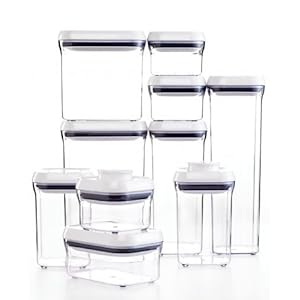
I'd love to buy this OXO Good Grips 10-Piece POP Container Set
. It's $98 on Amazon. Amazon always has the best prices on everything, from what I've found over the last 5 years. It's just so expensive for 10 containers. I want something to store pasta, rice, snacks, chocolate chips, etc. Any suggestions for something similar to these, but cheaper?
I have recently decided - partially with Chris, but mostly on my own - to make a change. Well, not just a change, but several.
#1 - Iwant need to be healthy - and fit. I'm not looking to specifically lose a certain number of pounds. I want need to feel better about myself mentally and emotionally, and feel physically better. I sit for far too long every day, especially now that it's summer and I'm not teaching. I'm still working this summer - on my blogs, on my TPT files, on my Etsy files, etc. - but I'm not active. My hypothyroid just plain sucks and I'm not going to let that be an excuse anymore for why I am physically unfit. So with being more active, I'm also changing the way I eat. I know both of these changes will make me feel better each day and I'll have more energy. It's a good change. I'll post about what I'm going for this change next week.
#2 - Iwant need to stop biting my nails. Such a gross habit, I know. It's a boredom thing, I think. I often catch myself doing it without knowing. It makes it even more gross when I do it at school while working with kids. The germs that have to be under those nails. *blah* Plus, I have a mani/pedi combo gift certificate from a student that I'd love to use to it's full potential - not on nasty gnawed down nails. I've tried the nasty tasting nail polish - that doesn't work for me. Any other ideas for me would be greatly appreciated. =]
#3 -I We want need to create a budget, stick to it, and pay off debt. This means meal plans (once again), a realistic money map (hate the word budget), cutting costs, less going out (of course), and more saving and paying more than the minimum on student loans. I don't think we've ever been able to stick to a budget for a whole month. It's time to become adults and just do it already. We're still stuck in our adolescent mindset here.
#4 - Iwant need to simplify in all areas of my life. I feel like I have too much "stuff". Too many clothes, too many purses, too many gadgets, etc. It's just overwhelming, really. I can't make a decision on what to use when I have more than one. And then when I'm using more of something else and rarely using the other, I just feel like "what's the point of keeping both/all of them"? For example - I have two Kindles. One e-ink and the Fire. Two different Kindles, same concept. I should get rid of the e-ink one, I guess, but what am I supposed to do with it? I'm not going to donate it or just give it away. I could sell it, but for what? It's almost not worth it to sell it. I even have the first generation Kindle that just sits in my closet. I'll never use that one again. I have some decisions to make regarding my clutter over the next month.
Have you recently decided to make any big changes in your life / home?
A Problem
We decided to eat healthier. We, as in Chris and I, together. We bought fresh fruit, quite a bit, to make a fruit salad. Usually we buy bananas or apples and that's the extent of our fruit buying. Our fruit bowl has been mostly used to hold grain products - buns, tortillas, rolls, bagels, etc. Well, the left over fruit doesn't fit nicely with the grains. That is a problem for me. It makes us both stay away from the whole situation in fear of dumping the whole bowl.
I decided I wanted to put the grains in the cupboard. Good luck finding room with the cupboard's current condition...
A Solution
I spent time rearranging, organizing, cleaning, searching for expired food, etc. I am pleased with the solution. The fruit gets its own bowl.
The grains go into a basket in the cupboard. Perfect.
Everything is now organized and easily accessible. Let's hope I can keep it this way all summer. =]
I'd love to buy this OXO Good Grips 10-Piece POP Container Set
A Decision for Change
I have recently decided - partially with Chris, but mostly on my own - to make a change. Well, not just a change, but several.
#1 - I
#2 - I
#3 -
#4 - I
Have you recently decided to make any big changes in your life / home?
6.18.2012
Cleaning Purses & Accessories
Today I took the time to clean out all of my purses and accessories and throw them in the wash. I didn't realize how many I have. So ridiculous.
The great thing about having purses and accessories made from cotton with removable bases (such as those from Vera Bradley & Thirty-One), is you can wash them - in the washing machine. It's SO nice. I've ruined so many purses in the past from getting stuff on them and not being able to clean them in an easy way.
So once a year I gather all of my purses and accessories and throw them in the wash. I do not dry them in the dryer. I set everything out and let it air dry. Think of all of the nasty bottom-of-the-purse germs I wash away.
How do you clean your purses & accessories? I'd love to know how to clean those that can't go in the wash.
The great thing about having purses and accessories made from cotton with removable bases (such as those from Vera Bradley & Thirty-One), is you can wash them - in the washing machine. It's SO nice. I've ruined so many purses in the past from getting stuff on them and not being able to clean them in an easy way.
So once a year I gather all of my purses and accessories and throw them in the wash. I do not dry them in the dryer. I set everything out and let it air dry. Think of all of the nasty bottom-of-the-purse germs I wash away.
How do you clean your purses & accessories? I'd love to know how to clean those that can't go in the wash.
Subscribe to:
Posts (Atom)


